Avoiding Technical Failures at Live Shows: Causes and Fixes
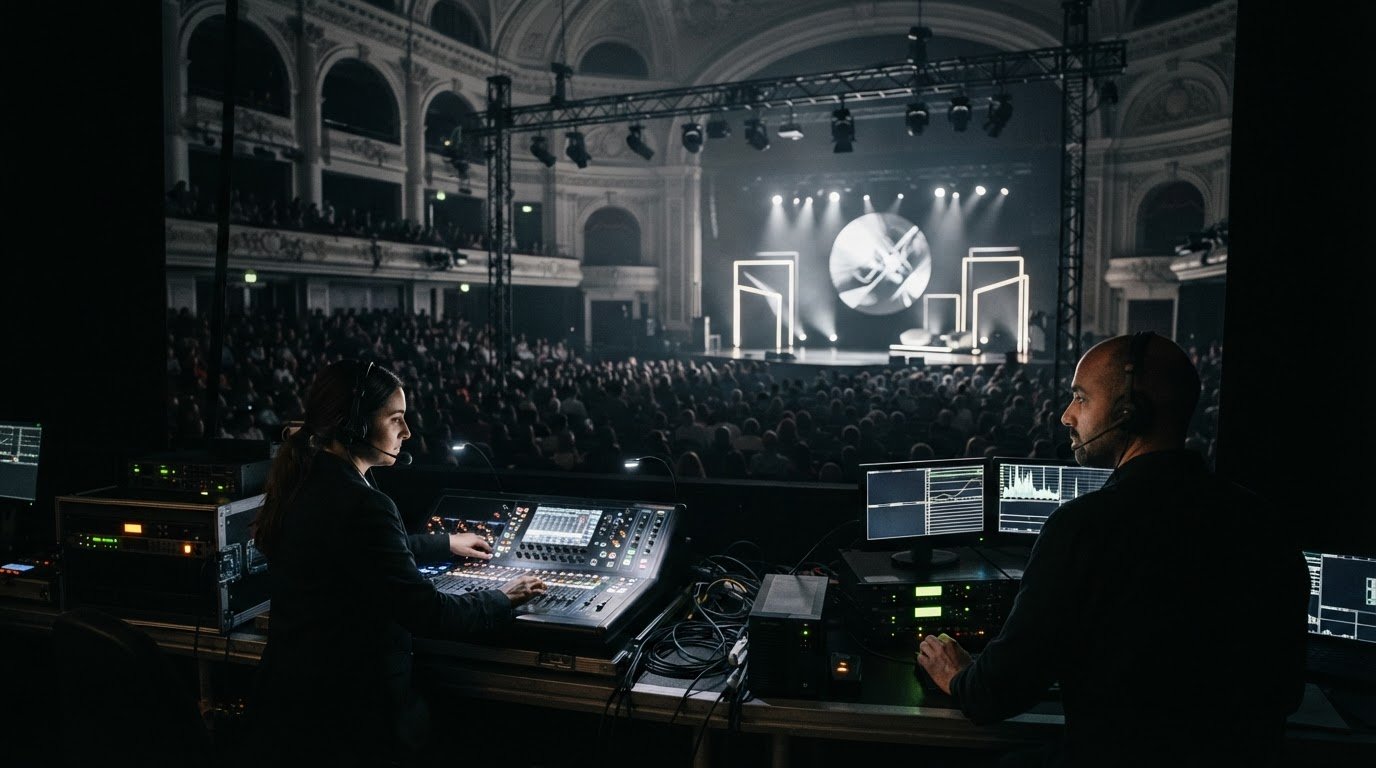
Most live-show failures are preventable. Avoiding technical failures during a live show starts with planning for weak venue infrastructure, untested equipment, late content and unclear crew responsibilities, then rehearsing how to respond. Tested backups, a thorough venue assessment and an on-site technical team can stop a fault becoming a visible disruption.
It makes sense to focus on equipment: a failed microphone, screen or internet connection can quickly affect the audience experience. But reliable kit alone isn’t enough. The handover between people, systems and show cues matters just as much when something goes wrong.
This guide covers common causes of technical failures at corporate live events and practical steps to reduce risk. Learn what to back up, how to make rehearsals more effective, what to assess at the venue and how a prepared crew can troubleshoot calmly on show day.
Key Takeaways
• Build redundancy around critical systems, including backup encoders and internet circuits, and test each fallback before the event.
• Plan power distribution carefully and use battery-backed UPS systems to help protect essential equipment from interruptions.
• Use technical walkthroughs and dress rehearsals to test equipment, cues and transitions in the venue before show day.
• Assess venue power, connectivity, access and rigging conditions early so infrastructure issues can be addressed in the production plan.
• Give the on-site crew clear responsibilities and troubleshooting protocols, so they can respond promptly without disrupting the show.
1. What Equipment Should Always Have a Backup at Live Events?
Prioritise backups for equipment that could interrupt the programme or audience experience if it failed. For a streamed corporate event, that may include a secondary encoder, an independent internet circuit, a presentation computer and a microphone. Test each backup in its working position and make sure the crew can reach it quickly.
In the US, the cost of backup equipment and live-event technical support depends on the equipment list, redundancy required, venue infrastructure and crew scope. Prices are provided after a quote request.
For a live stream, pair the primary encoder with a tested secondary encoder and a separate internet circuit. A backup connection only helps if the production team can switch to it without losing the programme. Test the changeover using the actual streaming platform, encoder settings and venue connection. Set a clear communication route between the technician monitoring the stream and the person authorised to switch circuits.
Prevent projector, video and streaming failures by testing the complete signal path before doors open. Run the final presentation from the show computer, check the projector or LED display, and monitor the outgoing video feed. When deploying specialist visual hardware or interactive displays from suppliers like NextGen AV, ensure all inputs and touch interfaces are thoroughly tested well in advance. Keep a known-good backup source ready, such as a second computer with the approved slides. If the screen goes blank, switch sources or restart the system using the crew’s agreed protocol. A technician monitoring the feed can spot image or playback problems early.
Keep a tested secondary microphone ready for the speaker, with spare batteries for wireless models. RF coordination and frequency scanning can reduce wireless dropouts; a standby wired microphone offers another option if the radio signal fails. For presentations, prepare a second computer with the final files and required adapters. Store it near the control position, not in a case across the venue. If the main microphone fails, switch first and troubleshoot the faulty unit during a break.
Lighting also needs practical backups. Keep spare cables and fixtures accessible, and test each fixture during load-in before rigging. If the lighting system depends on a console, plan and test an alternative control route before the show. A replacement fixture is useful only if the crew can access and connect it without disrupting other equipment. Include the lighting contingency in the technical plan, alongside the visual cues it needs to preserve.
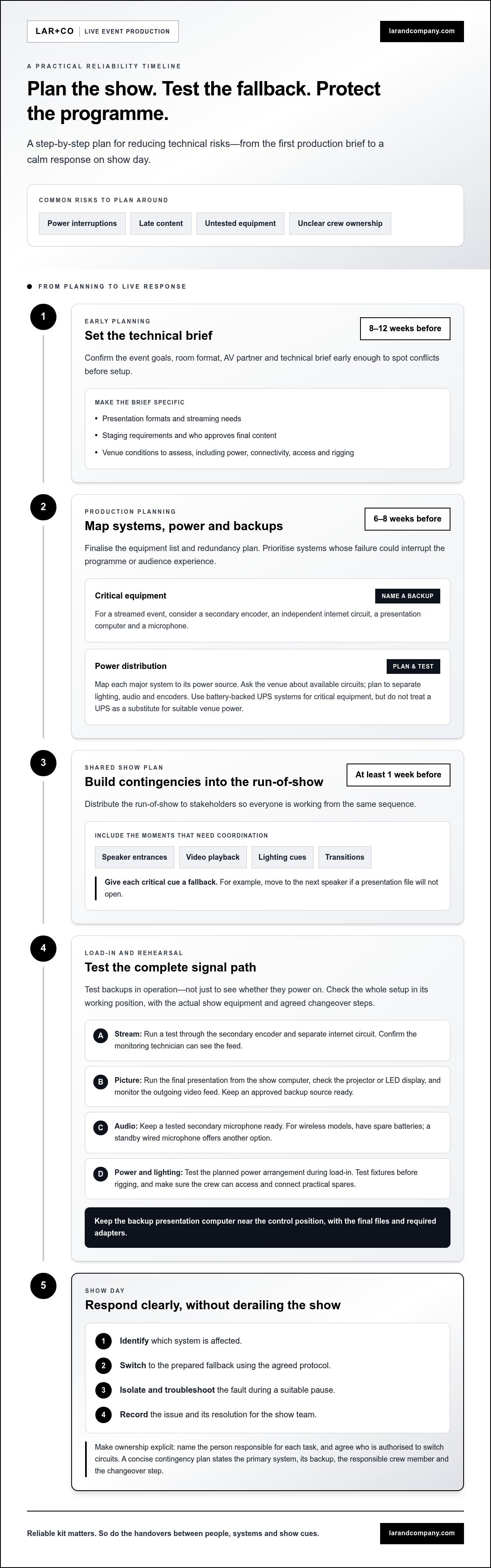
A concise contingency plan names the primary system, its backup, the crew member responsible and the changeover step. Test backups in operation, rather than assuming a spare device works because it powers on. For example, run a test stream through the secondary encoder and circuit, then confirm the monitoring technician can see the feed. This makes the response clear before a fault occurs and supports avoiding technical failures during a live show.
2. What are the most common causes of technical failures at corporate live events?
Power problems often start with an unclear equipment load, shared circuits or poorly planned distribution. Power planning can help reduce the risk of related production systems failing together. If that circuit trips, several parts of the production can fail together. Map each major system to its power source, then identify which failures could affect the audience or programme.
Use battery-backed uninterruptible power supply (UPS) systems for critical equipment that needs to ride through a power interruption. A UPS can keep equipment running briefly, but it isn’t a substitute for a suitable venue supply. Ask the venue team to identify available circuits, then plan to separate lighting, audio and encoders. Circuit redundancy reduces the chance that one fault takes down the entire stream. Test the planned arrangement during load-in.
Late technical planning creates a different risk. Confirm event goals, room format, the AV partner and the technical brief 8–12 weeks before the event. A clear brief records presentation formats, streaming needs, staging requirements and who approves final content. This gives the production team time to spot conflicts, rather than discovering them during setup. Finalise the equipment list and redundancy plan 6–8 weeks before the event.
A run-of-show that lacks contingencies can turn a small fault into a programme delay. Build the document around speaker entrances, video playback, lighting cues and transitions. Add a clear fallback for each critical cue, such as moving to the next speaker if a presentation file won’t open. Distribute the run-of-show to stakeholders at least one week before the event, so everyone works from the same sequence.
Load-in failures often stem from unclear ownership. The plan should state the setup order, who is responsible for each task and when it must be complete. For example, assign separate owners to test the projector, connect the presentation computer and clear the stage before doors open. If a deck arrives shortly before guests enter, there’s little time to test playback or fix formatting.
Common faults include power loss, failed presentation playback, audio interruptions and blank screens. Troubleshoot quickly by identifying the affected system, switching to its prepared fallback, then isolating the fault during a suitable pause. Record the issue and its resolution for the show team.
A production planning discussion helps align technical requirements, schedules and responsibilities before they become show-day problems.
3. What makes a technical rehearsal effective?
A rehearsal is effective when it tests the show as it will run, not just whether equipment powers on. Plan technical rehearsals two to three weeks before the event, so speakers, crew and venue teams can reserve time. Schedule at least two sessions: one for technical checks and one for a full run. This gives the production team time to correct faults before doors open.
Start with a technical walkthrough at the venue two to three days before the event. Check the actual stage, control position, cable routes and audience sight-lines. Run each microphone, presentation file, screen, lighting cue and stream connection from its planned position. A laptop test in an office won’t reveal a cable path that’s too short or a screen obscured by the stage layout.
Use the walkthrough to test the entire signal path, from source to audience. Play presentation videos, advance slides and check that sound reaches the room clearly. Test the streaming platform and encoder one to two weeks before the event, then repeat the check at the venue. Confirm that the stream reaches its destination and that the monitoring team can see and hear the output.
A full dress rehearsal with speakers should take place one day before the event. Run the programme from opening to close, with presenters, stage movements, playback, lighting changes and every technical cue in sequence. If a speaker’s slides appear late, rehearse the agreed holding cue. If a video fails, practise moving to the next segment without leaving the audience watching a frozen screen.
Record cue timing during the run. Note when a microphone should be live, when a visual should appear and who gives the signal. The stage manager can call each cue while operators execute it. Rehearse handovers between speakers too: an unclear entrance or delayed presentation change can interrupt the programme even when every device works. The same precision applies when introducing live entertainment; seasoned performers such as Chris Dodd Magic rely on clear cue management and sound checks to ensure acts integrate smoothly into the wider event programme.
Test backup systems during rehearsal, rather than treating them as a separate assumption. Switch to the alternate microphone, source or stream route, then restore the primary system. This confirms that crew members know the changeover and can complete it under show conditions. Assign someone to record faults, their causes and fixes, so unresolved issues have a clear owner.
Use the final rehearsal to confirm files and versions. Open the approved presentation on the show computer, check embedded video and fonts, and remove superseded copies from the playback folder. Finish with a short crew briefing: confirm cue callers, communication channels and the first response to likely faults. This focused testing builds confidence and improves production precision.
4. Venue power, internet, and infrastructure assessment
Carry out a site survey 6–8 weeks before the event. Measure room dimensions and assess acoustics, audience sight-lines, access routes and technical positions. Mark where the stage, screens, control desk and cable runs will sit. Walk the route from loading entrance to stage with venue staff. This reveals narrow doors, lifts or restricted access that could affect equipment arrival and setup.
Agree the load-in schedule with the venue before finalising the production plan. Record delivery windows, access points, lift arrangements and who opens each restricted area. Sequence setup tasks so crews aren’t waiting for another team to clear a route. Plan derig timing too: confirm when cases can leave the room and whether another event needs the space immediately.
For corporate events with LED walls, moving lighting rigs or broadcast equipment, coordinate dedicated high-amperage power with venue engineers. Ask them to identify usable supplies and connection points. Where possible, map lighting, audio and encoders to separate circuits. This reduces the risk of one electrical fault interrupting several systems. Include required power connections in the site plan.
Assess internet access at the venue, rather than relying on general Wi-Fi. Test the connection weeks before the event and arrange a dedicated, hardwired line for the broadcast team. Confirm where the line enters the room and how it reaches the encoder position. Test the actual route and connection under show conditions. A wired connection gives the stream team a designated path instead of shared public access.
Check the building structure before planning suspended equipment. Review venue structural blueprints and use certified rigging professionals for overhead fixtures or other suspended loads. Match proposed rigging positions to permitted structural points. Record restrictions in the production plan and communicate them to the lighting and staging teams. Never let a visual design assume a rigging position the venue cannot support.
Use the survey to confirm that technical areas are practical as well as available. Check sightlines from the control desk, cable routes away from audience movement, and access to power and internet connections. Ask venue staff about known infrastructure limitations, then document the operational response. If a planned camera position blocks an exit route, revise the layout before load-in.
Before show day, review the site plan with the venue contact and department leads. Confirm access, power sources, internet routing, rigging positions and setup sequence. Test designated connections during load-in, then monitor them during rehearsal. Practise switching to the planned fallback if a primary connection fails. Clear documentation gives every crew member the same venue map and working assumptions.
5. On-site technical crew and show-day troubleshooting
On show day, clear ownership matters as much as technical skill. A technical director coordinates presentation software, video switchers and stream encoders so each system works as part of one production. Confirm who makes decisions, who calls cues and who communicates with the client. Under pressure, one clear communication route helps prevent conflicting instructions and rushed mistakes.
Assign a dedicated crew member to monitor audio levels throughout the event. If sound drops, troubleshoot from the destination backwards through the signal chain. Check the room output first, then the mixer, input and microphone. This sequence narrows the fault without changing several settings at once. RF dropouts, network failures and intermittent power can all affect live-event audio.
For a blank screen, identify whether the fault is at the source, switcher, projector or LED display. Check the selected input and visible signal before restarting equipment. If the primary source fails, switch to the prepared backup. A technician monitoring the video feed can spot freezing or loss of picture early, before the audience misses more than a moment.
Lighting faults need a different diagnosis. A fixture that stops responding may indicate a DMX issue, while cues drifting out of sequence can point to timecode trouble. Tell the lighting operator which fixture or cue is affected, then use the agreed fallback state. Avoid changing several channels during a live cue. That makes the fault harder to trace and may disrupt the visual design.
Practise likely failure scenarios with the crew before doors open. Simulate a failed microphone, lost presentation signal and stream interruption. Everyone should know the first action, backup route and how to communicate status. Wired or wireless intercom systems can keep departments connected while the stage manager protects programme timing. A short, shared call such as “switching to backup” reduces uncertainty.
During a fault, protect the audience experience first. Switch to the fallback, keep the programme moving where possible, and investigate the failed system during a safe pause. Once the issue is resolved, tell the relevant lead what changed and whether the primary route is ready again. Rehearsed procedures support avoiding technical failures during a live show by turning a potential disruption into calm, coordinated action.
For a complex event, discuss your show requirements and the technical coordination they demand.
Lar&Co: Show Production
Lar&Co is a production partner for corporate live events that depend on precise technical delivery and a coordinated show plan. Its Show Production and Technical Production bring creative vision and technical requirements together, while Site Management supports the practical demands of delivery at the venue.
Turn to Lar&Co when your event involves multiple production elements, a live audience or a broadcast component that calls for careful planning. Early alignment connects the programme, venue requirements and technical approach before show day. Creative Direction can also shape how staging, lighting and visual content work together as one experience.
For a conversation about your event, contact Lar&Co.
Make reliability part of the event design
A reliable show takes shape long before the first cue. Treat technical decisions as part of the event’s design, not a final production check. Align the audience experience with the people, systems and venue conditions needed to deliver it. A disciplined approach to avoiding technical failures during a live show also gives teams room to respond without letting a fault dictate the programme.
For your next event, make operational resilience an early planning decision. Define what must remain uninterrupted, where the team can adapt and who has authority to act. Lar&Co brings production planning and on-site delivery into one coordinated approach, with support shaped around the event’s needs.
Contact Lar&Co about your event and take the next step towards a composed, carefully delivered live experience.
Frequently Asked Questions
What are the most common causes of technical failures at corporate live events?
Planning gaps, overloaded infrastructure and unclear ownership are common causes of technical failures. A venue’s shared wireless network, for example, may struggle when attendees and production systems connect at once. File-format conflicts can also interrupt a presentation, even when the screen and computer work correctly. Map dependencies between systems, assign an owner to each check and document the first response to faults that could interrupt the programme.
What Steps Can Live Event Production Teams Take to Minimize Risk?
Reduce risk by assigning each critical system a named owner and a clear response plan. Maintain a working risk register that records the possible fault, its effect on the programme, the person responsible and the action to take. Review it with venue and production leads when the schedule changes. This makes new dependencies visible, such as a revised speaker format affecting playback, timing or streaming.
What makes a technical rehearsal effective?
An effective rehearsal tests transitions, not just individual devices. Run a speaker handover at show pace, including stage movement, microphone changes and the next presentation cue. Ask the operator to confirm the correct file and version before playback. Log faults with an owner and resolution deadline, then retest the affected cue. This turns rehearsal observations into specific changes instead of an informal list of issues.
How Do Production Teams Communicate Quickly During a Live Show?
Use a dedicated crew channel and short, closed-loop messages. Name the person you’re addressing, describe the location or system, then state the action needed. For example: “Video operator, stage screen, hold the next clip.” The recipient should acknowledge the instruction, and the caller should confirm it’s complete. Keep non-urgent discussion off the live channel so cue calls stay clear and actionable.
What Equipment Should Always Have a Backup at Live Events?
Prioritise backups for equipment whose failure would stop a key moment: the speaker’s audio path, presentation playback and the stream’s outgoing signal. Match each spare to the actual show setup, including connectors, approved files and required settings. A backup that cannot connect or open the correct material isn’t operationally useful. Keep it accessible to the person authorised to make the changeover.
What should I include in my event redundancy plan?
For each critical system, record the primary route, alternative route, changeover owner and condition that triggers a switch. Document dependencies too: an alternate video source may still rely on the same power supply or network. Note where the backup is stored and how the crew will communicate during a changeover. This makes the plan useful under pressure, rather than simply an equipment inventory.
Why Do Technical Errors Have Such a Lasting Impact on Audiences?
Visible technical errors interrupt the audience’s attention just as an event should be flowing. A silent microphone can obscure a speaker’s point; a frozen visual can leave attendees unsure whether to keep watching. The disruption may also undermine confidence in the programme’s organisation. A composed response helps restore focus: acknowledge the pause briefly, maintain the next cue and keep troubleshooting conversations out of the room.
Why are technical risks higher in large-scale events?
Large-scale events bring more connected systems, departments and handovers into one programme. A change to the running order can affect speaker cues, screen content, lighting and broadcast timing. Longer cable and signal paths also create more points to inspect. Give each department a shared schedule, define who approves changes and pass updates through one agreed channel so teams don’t act on different versions.